
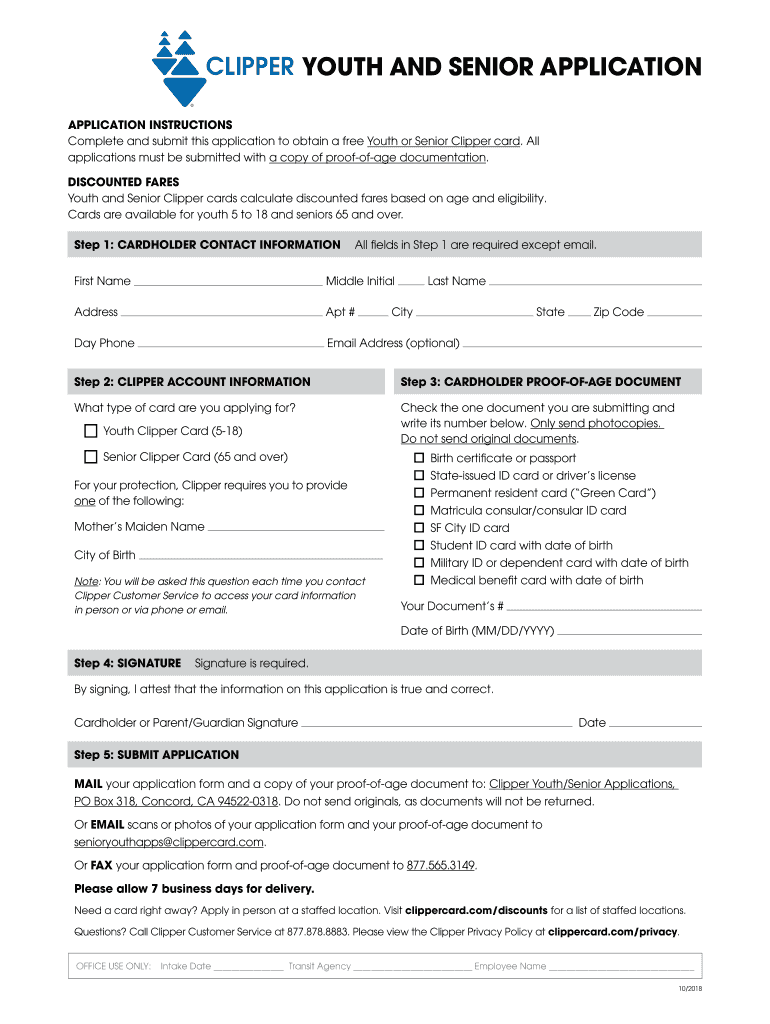
Clipper Youth and Senior Application 2018-2026 free printable template
We are not affiliated with any brand or entity on this form

Fill out
Complete the form online in a simple drag-and-drop editor.

eSign
Add your legally binding signature or send the form for signing.

Share
Share the form via a link, letting anyone fill it out from any device.

Export
Download, print, email, or move the form to your cloud storage.
Why pdfFiller is the best tool for your documents and forms


End-to-end document management
From editing and signing to collaboration and tracking, pdfFiller has everything you need to get your documents done quickly and efficiently.
Accessible from anywhere
pdfFiller is fully cloud-based. This means you can edit, sign, and share documents from anywhere using your computer, smartphone, or tablet.
Secure and compliant
pdfFiller lets you securely manage documents following global laws like ESIGN, CCPA, and GDPR. It's also HIPAA and SOC 2 compliant.
What is Clipper Youth and Senior Application
The Youth and Senior Clipper Card Application is a personal form used by eligible individuals to apply for a discounted fare Clipper card in California.
pdfFiller scores top ratings on review platforms




Who needs Clipper Youth and Senior Application?
Explore how professionals across industries use pdfFiller.

Clipper Youth and Senior Application is needed by:
-
Youth aged 5 to 18 in California seeking discounted transit fares
-
Seniors aged 65 and over looking for senior discounts on transit
-
Parents or guardians applying on behalf of youth applicants
-
Residents of California needing affordable transit options
-
Individuals needing proof-of-age documentation for transit savings
How to fill out the Clipper Youth and Senior Application
-
1.Access the Youth and Senior Clipper Card Application form by visiting pdfFiller and searching for the form name in the search bar.
-
2.Open the form in pdfFiller by clicking on it and select 'Edit' to enable form-filling features.
-
3.Begin by gathering the necessary information such as the applicant’s first name, last name, address, city, state, zip code, day phone, and email address.
-
4.Fill in each field accurately using pdfFiller's fillable fields; ensure spelling and details are correct to avoid processing delays.
-
5.Select the type of card you are applying for, check the applicable proof-of-age document checkboxes to indicate compliance.
-
6.Once all fields are completed, carefully review the entire application for any errors or missing information.
-
7.Finalize the application by entering your signature in the designated signature field; this may require approval if signed by a guardian.
-
8.To save your application, click on the 'Save' button, which allows you to download the form as a PDF.
-
9.You may also submit the form via mail, email, or fax as required, ensuring that you include the necessary proof-of-age documentation.

Who is eligible for the Youth and Senior Clipper Card?
Eligibility for the Youth Clipper Card includes individuals aged 5 to 18, while seniors must be 65 years or older. Both must be residents of California to apply.
What documents do I need to submit with my application?
You will need proof-of-age documentation, which can include a birth certificate, ID, or any official document verifying your age. Ensure these documents are submitted with your application.
What are the submission methods for the Clipper Card Application?
Applications can be submitted through mail, email, or fax, as per your convenience. Ensure that all required documents are attached to avoid processing delays.
Are there any fees associated with applying for the Clipper Card?
The Youth and Senior Clipper Card is provided at no cost, making it an excellent opportunity for eligible individuals to save on transit fares throughout California.
How long does it take to process my Clipper Card Application?
Processing times may vary, but typically, applicants should expect to receive their cards within a few weeks if all required documents are submitted correctly.
What common mistakes should I avoid when filling out the form?
Ensure all information is accurate and complete. Common mistakes include missing signatures, incorrect address details, and failing to check the proof-of-age documents.
Can parents or guardians fill out the application for their children?
Yes, parents or guardians can complete the application on behalf of youth applicants. However, a signature is still required from the guardian.
Related Forms




Get the latest insights from our blog


If you believe that this page should be taken down, please follow our DMCA take down process
here
.
This form may include fields for payment information. Data entered in these fields is not covered by PCI DSS compliance.